Last lesson: Oct 2
MA
Guide for tutors
Keep one place per student, split it by topic, and teach the lesson from that place instead of from your desktop. Then nothing has to be sent after the lesson, and next week you open the student and carry on. Here is the system, first with the tools you already have, then in Tuboard.
Updated
Lessons, materials and progress for every student in one place.
Most independent tutors run on three tools: a call for the lesson, a messenger to send things, and a drive or Notion to keep them. Every file makes the same trip. It sits on your screen during the lesson, goes into the chat afterwards, lands on the student's phone as a copy, and reaches a folder if you remember. By March the latest version of an essay is somewhere in a thread, between messages about moving the lesson.
Whatever tool you use, the structure that lasts a school year has three levels. Sort by student first, because that is how you open your week. Inside each student, sort by topic, because the syllabus and the student's gaps are organised that way. Then each lesson's materials go into the topic it covered.
Maria, Daniel, the Year 9 group. Different students' materials never share a folder.
A date says when. A topic says where to carry on: "Quadratic equations", "Essay structure".
Recurring mistakes get their own topic, so you see the pattern before the mock exam.
YouTube videos, past paper links and Google Docs sit in the topic, not in your bookmarks.
Most of the mess comes from versions. Keep one live document per piece of work and edit it, instead of sending "essay v2", "essay v3" and "essay FINAL". When you do keep a file, name it by topic and paper, not by date: "Quadratics, Paper 1 2023" is easy to find in March, and "scan_0412.pdf" is not.
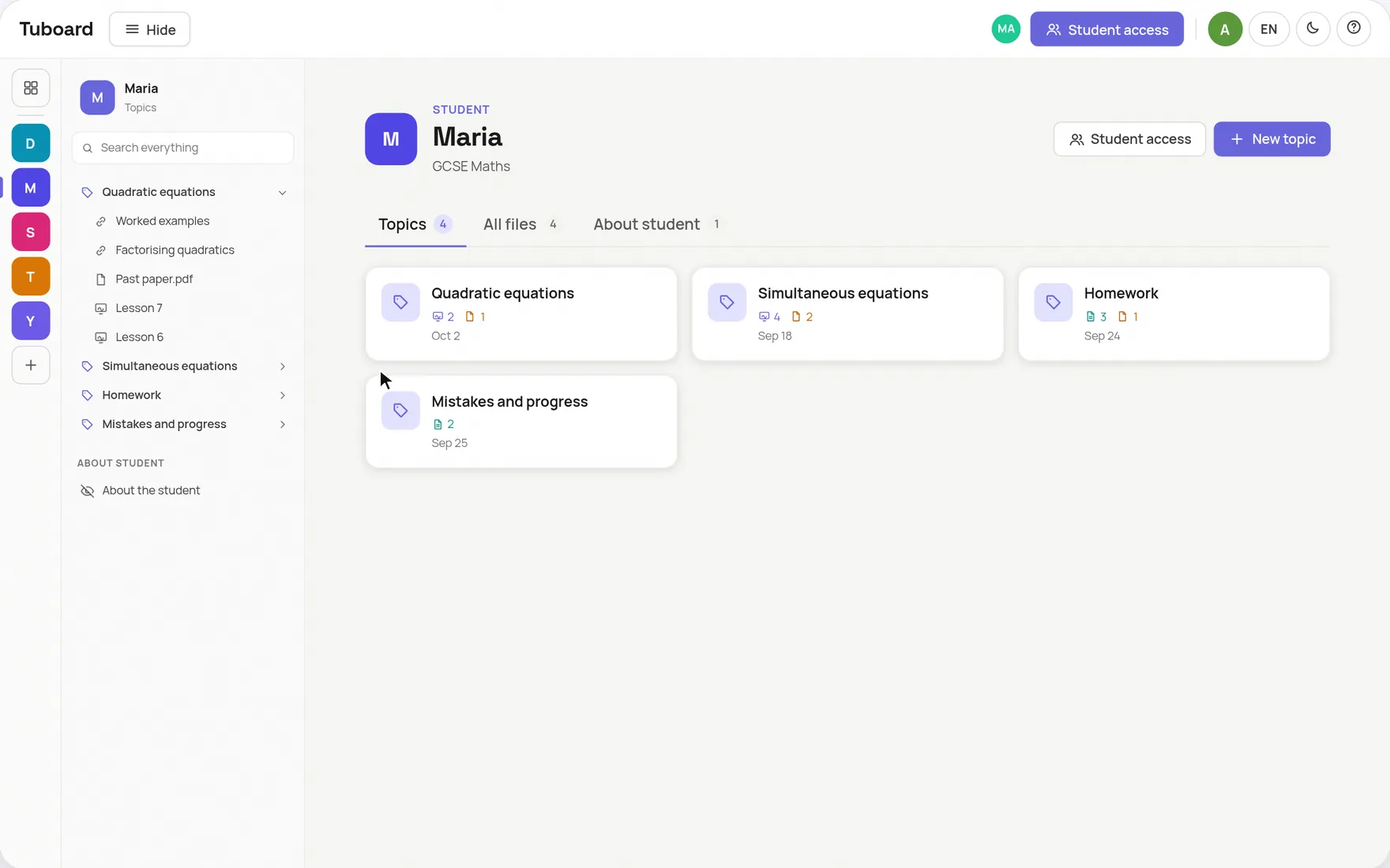
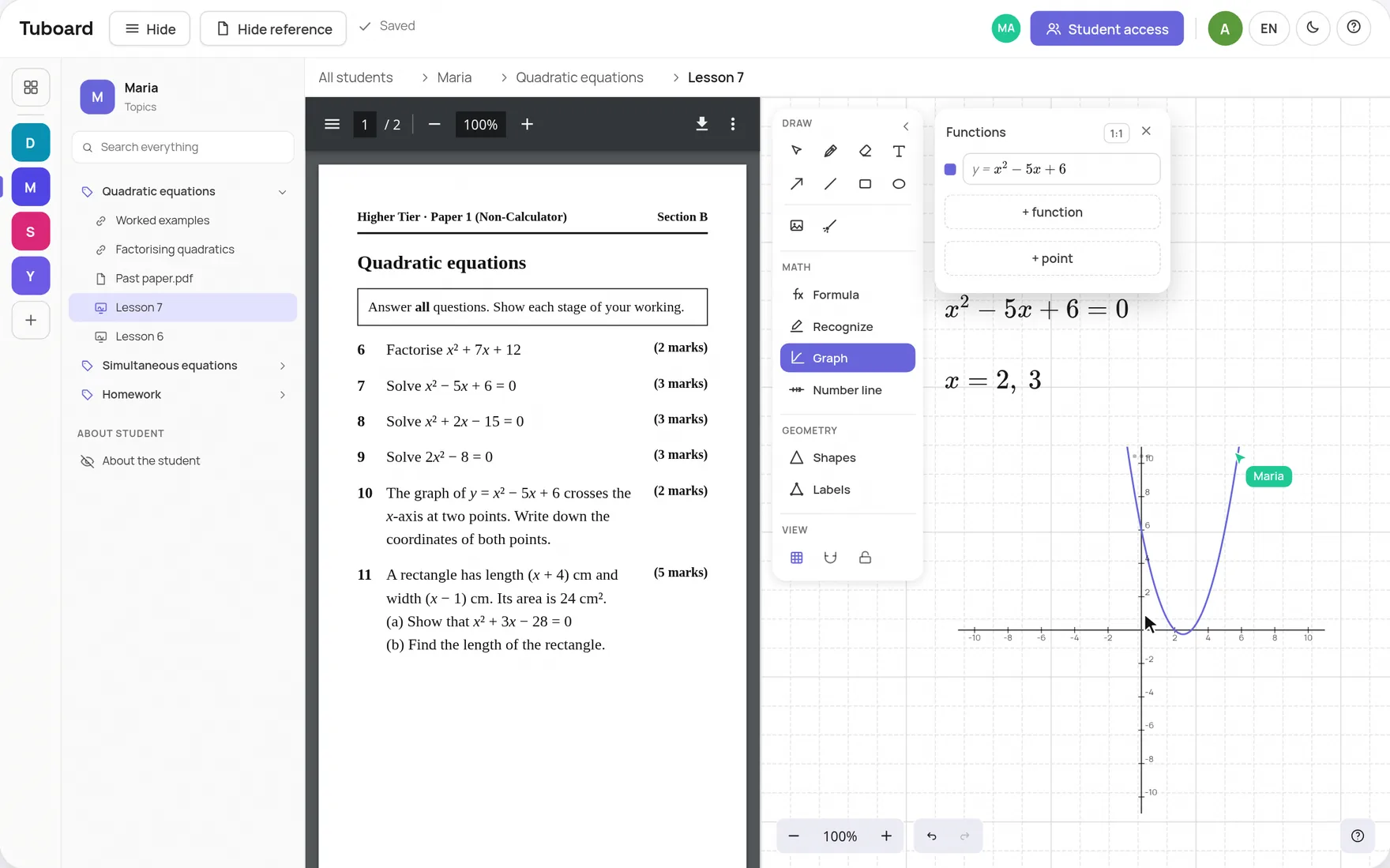
The step most systems miss is the lesson itself. If you teach from your desktop and file afterwards, filing is a chore that slips. In Tuboard the workspace is where the lesson happens. You open the student and the topic, the PDF opens beside the board, and your student joins by link and writes on the same board. When the call ends, the board, the notes and the files are already in the topic.
You can build this structure in Notion or Google Drive: a page or folder per student and a sub-page per topic. For storage it works. Two things stay outside it. The lesson still happens on a screen share or a separate whiteboard, and the student gets copies sent instead of opening the same thing you do. If that suits you, keep your drive. If the sending is what wears you down, that is the part Tuboard removes.
A page per student with sub-pages per topic. Formulas need LaTeX, and the board lives elsewhere.
A folder per student. Files are easy to share, and each lesson's board is still another tool.
Good for moving a lesson to 7pm. As an archive it cannot be searched by topic.
A workspace per student, topics inside it, and the lesson taught in the topic.
Sort by student first, then by topic, and keep each lesson's board, notes and files in the topic it covered. Teach from the same place, so nothing has to be sent or filed after the lesson.
By topic. You come back to a topic when the student gets stuck on it again or before an exam, and you rarely come back to a date. If the date matters, put it in the file name.
Paid Notion tutor dashboards exist and give you a page per student, which organises storage well. The lesson still happens somewhere else, so the sending and copying stay. Tuboard keeps the same structure and puts the lesson inside it.
Give them access to the place the materials live instead of sending copies. In Tuboard you send one link per workspace. The student opens it, types their name and sees the same topics you do, with no account.
PDFs and other files drag straight into a topic. There is no automatic import from a messenger or from Notion, so the move is manual, but you only do it once.
Create a workspace, add the topic you teach next and send the link before the lesson.
How it works from the inside.
One workspace per student or group, sorted by topic, with the lesson inside it.
ExploreA PDF beside the board, formulas, graphs and labelled figures. The board lives in the student's topic.
ExploreFractions, roots, integrals and matrices from the keyboard. No LaTeX required.
ExploreWhy general documents and whiteboards do not carry maths in a lesson.
ExploreGuides and comparisons.
Keep your call and open the board beside it. The student joins by link.
ExploreTuboard, Bitpaper, Lessonspace, Zoom, Miro and Excalidraw side by side.
ExploreFree in beta and organised by student, with the call left to Zoom or Meet.
ExploreA board students open from a link, with maths tools Jamboard never had.
ExploreFormulas, LaTeX, graphs and labelled figures on an Excalidraw board.
Explore