Skip to content

After Jamboard

A Jamboard alternative for tutors and teachers

Google shut Jamboard down after 31 December 2024 and deleted the jams that were left. If you used it with students, the replacement has to open from a link without an account and keep the work between lessons. Tuboard does both, and adds the maths tools Jamboard never had.

Updated

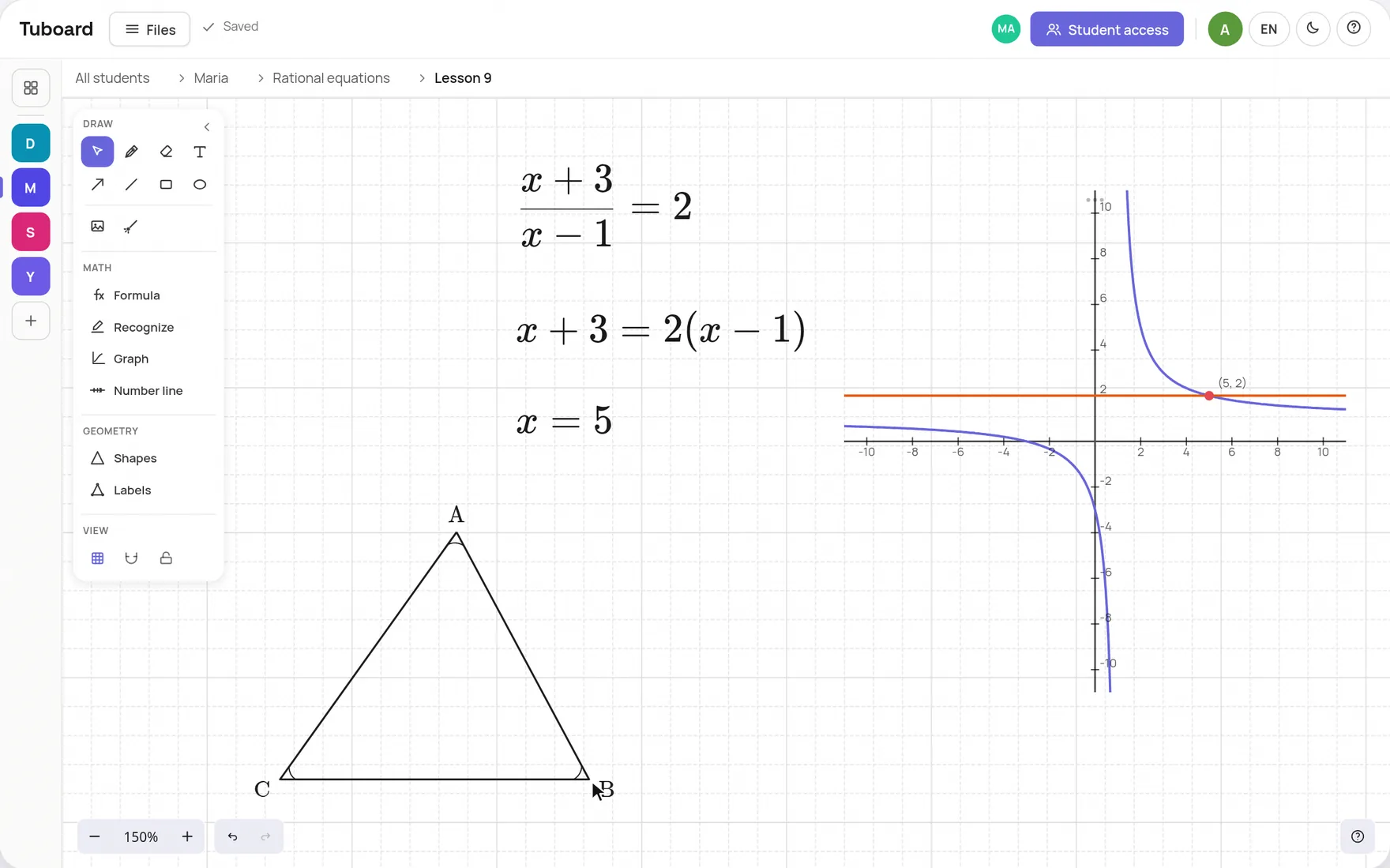
A lesson in Tuboard with a textbook PDF open beside the board. The tutor takes an exercise from the page and types it as a fraction from the symbol palette, the student types the answer on the same board, both sides of the equation are plotted as a graph next to the working, and a triangle is drawn with its corners already labelled.

What happened to Jamboard

Google announced the shutdown in September 2023. Jamboard became view only on 1 October 2024 and closed after 31 December 2024. Google pointed users to FigJam, Lucidspark and Miro, whiteboards built for teams at work. For a tutor that means seats, sign-ups and a blank canvas that knows nothing about the student.

Closed for good

View only from 1 October 2024, gone after 31 December 2024.

Replaced by team tools

FigJam, Lucidspark and Miro are built around work accounts and seats.

Maths was always a drawing

A fraction on a jam was handwriting or a text box, never a formula.

One jam at a time

Jams sat in your Drive, not next to that student's notes and PDFs.
What a tutor needs from the replacement

Jamboard worked in lessons because it was simple: a link and a pen. Keep that, and add what a lesson needs that a meeting board never had.

Students join from a link

No account and no install. They type their name and they are on the board.

Work kept per student

Boards stay in that student's workspace, sorted by topic, for next week.

Maths as real objects

Fractions, roots and graphs you can edit, not handwriting.

Your PDF beside the board

Open a worksheet or past paper next to the board and work through it.

How Tuboard works in a lesson

You open the student's workspace and press Send lesson link. The student opens the link, types their name and writes on the same board as you, live. You choose whether they can edit or only watch. After the lesson the board stays in the student's topic, next to the notes and PDFs from the same lesson.

  • Free while Tuboard is in beta
  • The student types their name, no account
  • Editing or view only, your call
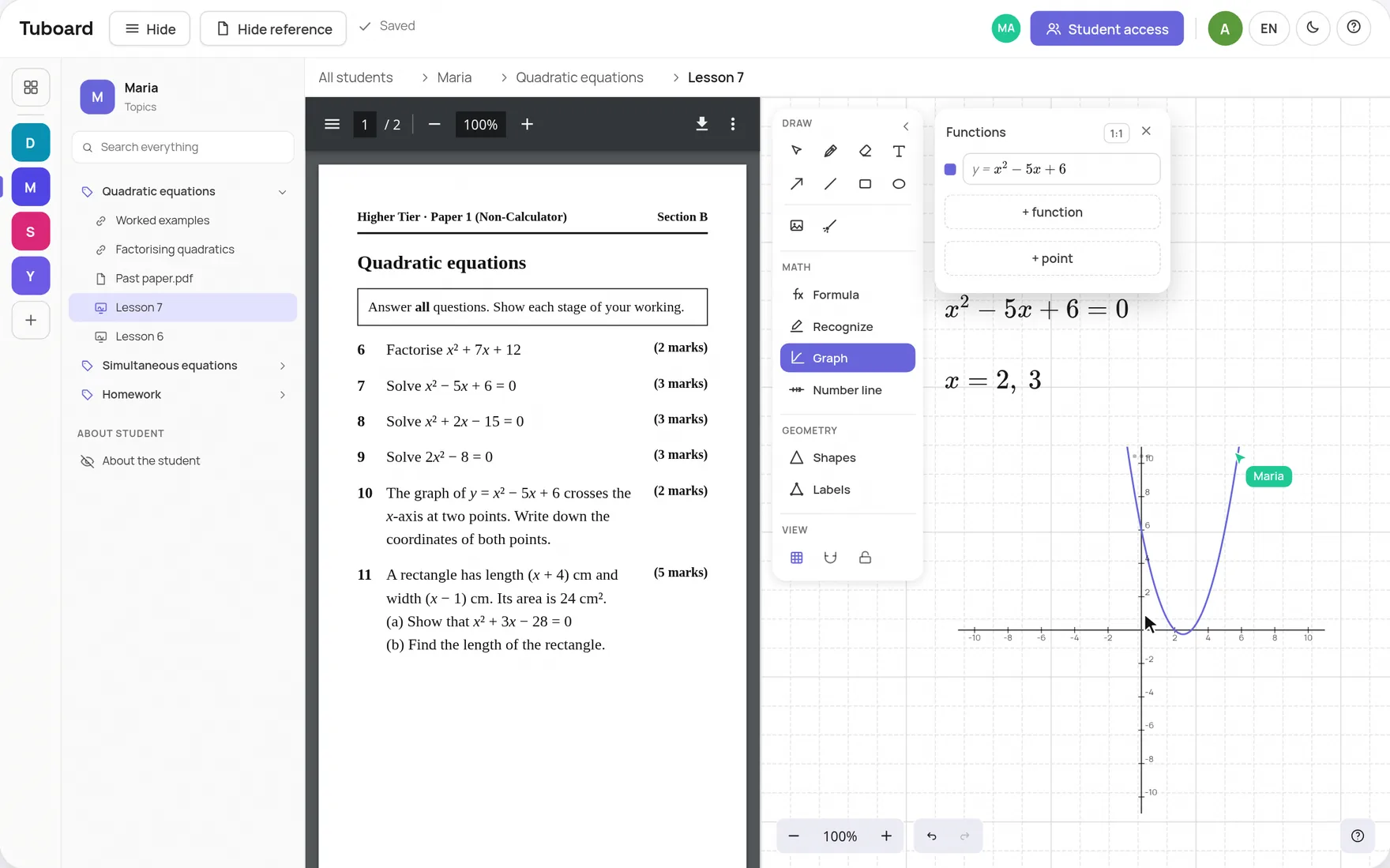
A lesson in Tuboard: a past paper on quadratic equations open on the left, and on the right the board with x² − 5x + 6 = 0 solved and plotted, with Maria's cursor on the same board

Drawing still feels simple

Pen, shapes, arrows, text, images and a laser pointer on an infinite board built on Excalidraw. If your students drew on Jamboard, they will know what to do here. If you do not teach maths, you never have to open the maths tools.

  • Pen, shapes, text and images
  • A laser to point at a step without drawing on it
  • Drop in a photo or screenshot of the task
A Tuboard board: the equation (x+3)/(x-1)=2 solved in three lines, a graph of both sides crossing at x = 5, and a triangle with its corners labelled A, B and C

The short answers.

Is there a free Jamboard alternative?

Tuboard is free while it is in beta, and a board opens without an account. A free account can create and edit 3 workspaces. Excalidraw is another free option for quick drawing, without the student workspace or the maths tools.

Can students join without signing in?

Yes. They open the link you send and type a name. Signing in with Google is optional, for a student who wants to open the workspace from another device.

Can I bring my old Jamboard files over?

There is no Jamboard import. If you downloaded jams as PDFs before the shutdown, add a PDF to the student's topic and it opens beside the board.

Does it work with Google Meet?

Yes. Keep the call in Meet and paste the Tuboard link into the Meet chat.

Is it for schools as well as tutors?

It is built for tutors who teach the same students every week, one to one or in small groups. A teacher can run a group in it, but there is no school admin, roster sync or LMS integration.

Open a board in ten seconds.

No sign-up to start. When you want a student in, send them the link.