Skip to content

Built on Excalidraw

Excalidraw with maths formulas, LaTeX and graphs

Excalidraw has no built-in way to write an equation. The request for LaTeX has been open on its GitHub since June 2022, and people get by with browser extensions that paste formulas in as pictures. Tuboard is built on Excalidraw and adds maths as real objects on the board: formulas, graphs, number lines and labelled figures.

Updated

A lesson in Tuboard with a textbook PDF open beside the board. The tutor takes an exercise from the page and types it as a fraction from the symbol palette, then the student types the answer on the same board.

Why maths is awkward in plain Excalidraw

Excalidraw is a good hand-drawn canvas that was never built for maths, so formulas, graphs and labels get faked with text boxes and lines.

Formulas as plain text

x^2 stays x^2, and a fraction is a line with two labels.

LaTeX through add-ons

Browser extensions render LaTeX as an image you cannot edit on the board.

No function graphs

A curve is drawn by hand or pasted in as a screenshot.

Figures labelled by hand

Vertices and angles go on one text box at a time, and they drift.
Formulas from a palette, or type LaTeX

Press M and click the board. A formula field opens with a palette beside it: fractions, roots, powers, matrices, systems, Greek letters. Tab jumps between empty slots and Enter starts the next line, so a solution grows down the board the way it does in a notebook. If you know LaTeX, type it straight in.

  • M for a formula, Tab between empty slots
  • Enter for the next line of the solution
  • LaTeX works, and is never required
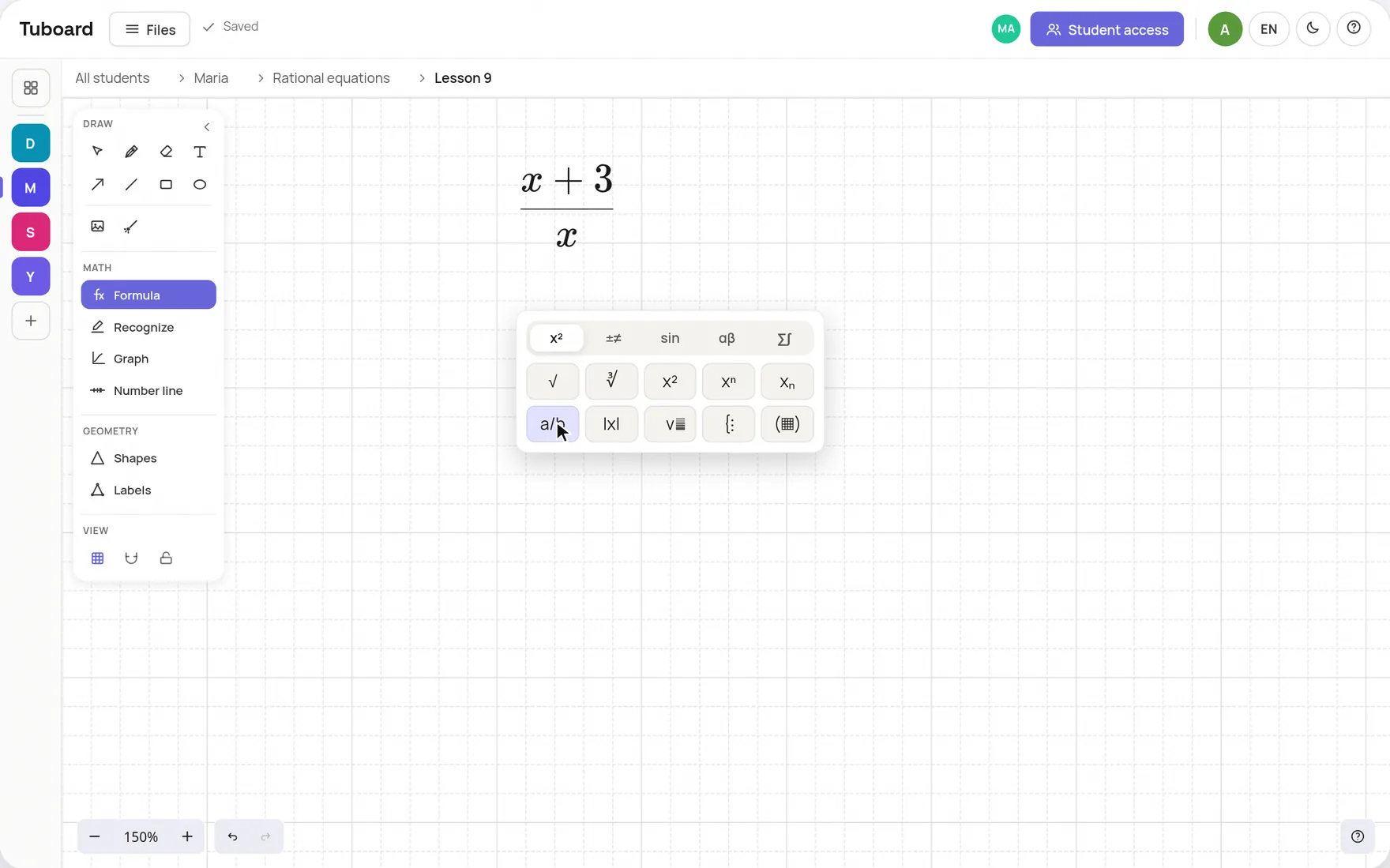
The Tuboard formula field with its symbol palette open: a fraction with x+3 on top being typed after a tap on the a/b button

Graphs, number lines and labelled figures

The things a maths lesson usually fetches from another app go on the board in one click and stay editable.

Function graphs

Type x^2 or sin(x) and add points. Several functions on the same axes.

Number lines

Points and intervals with open and closed ends, for inequalities.

Labelled figures

Triangles and polygons with vertices, sides and angles labelled.

The Excalidraw you know

Pen, shapes, arrows, text, images and the laser on the same hand-drawn canvas.

A board inside the student's workspace

Tuboard puts the board inside a workspace per student, sorted by topic, next to notes and PDFs. You send a link, the student types their name, and you both write on the same board live. A past paper or a textbook page opens beside the board.

  • Live collaboration from a link, no account for the student
  • Notes with inline formulas next to the boards
  • A workspace per student, sorted by topic
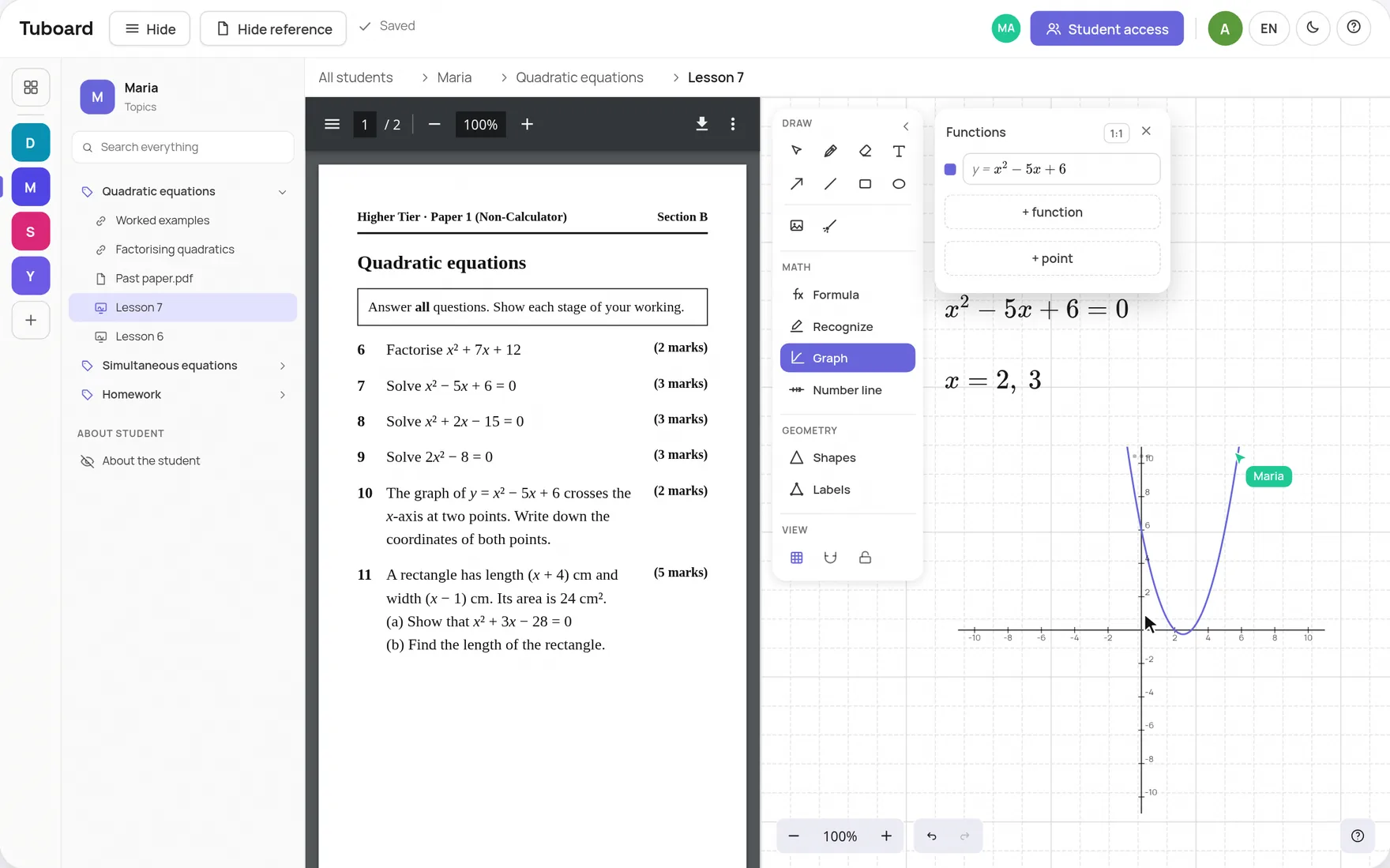
A lesson in Tuboard: a past paper on quadratic equations open on the left, and on the right the board with x² − 5x + 6 = 0 solved and plotted, with Maria's cursor on the same board

The short answers.

Does Excalidraw support LaTeX?

Not natively, as of November 2026. The feature request has been open on Excalidraw's GitHub since June 2022, and third-party browser extensions can render LaTeX as images on the canvas. Tuboard, which is built on Excalidraw, has formulas built in.

How is Tuboard related to Excalidraw?

Tuboard uses Excalidraw as its drawing engine. On top of it, Tuboard adds formula input, function graphs, number lines, labelled figures and the student workspace around the board.

Can I collaborate live, like in Excalidraw?

Yes. You send a link, the other person types their name and you both edit the same board live. To send links you sign in with Google. The person joining needs no account.

Can I write maths in notes too?

Yes. Notes sit next to boards in a topic, and Ctrl+M puts a formula inline in the text. For longer working there is a Solution block where Enter adds the next step.

Is it free?

Free while Tuboard is in beta. A board opens without an account. A free account can create and edit 3 workspaces, and Tutor Pro is planned at about $10 a month.

Type your first formula on an Excalidraw board.

Open a board, press M and type a fraction. It takes about ten seconds.