Last lesson: Oct 2
MA
Comparison
Bitpaper is a solid whiteboard for tutors, and since its pricing change a tutor needs the $15 a month Tutor Plan to create papers. If you are looking around, ask where each student's work will live between lessons. For a tutor with regular students, that matters more than how the pen feels.
Updated
Lessons, materials and progress for every student in one place.
Bitpaper's prices and features below are taken from bitpaper.io on 4 November 2026. Plans change, so check their site before you decide.
| Price for a tutor | Free plan | Video and audio | How work is kept | PDFs | Export | |
|---|---|---|---|---|---|---|
| Tuboard | Free during beta. Tutor Pro planned at about $10 a month | Create and edit 3 workspaces | None. Keep Zoom or Meet | A workspace per student, split into topics | Open beside the board | Materials to a file |
| Bitpaper | Tutor Plan, $15 a month | Join a tutor's papers, cannot create them | Built in, with chat and screen share | Papers, each on its own link | Dropped onto the paper | PDF export |
If you want the call and the board in one tab, Bitpaper has that and Tuboard does not, by choice. If you mostly teach one-off sessions, a paper per lesson is all the structure you need, and workspaces add little.
Bitpaper runs audio, video and chat next to the board. Tuboard leaves the call to Zoom or Meet.
Without returning students, there is no history to keep together.
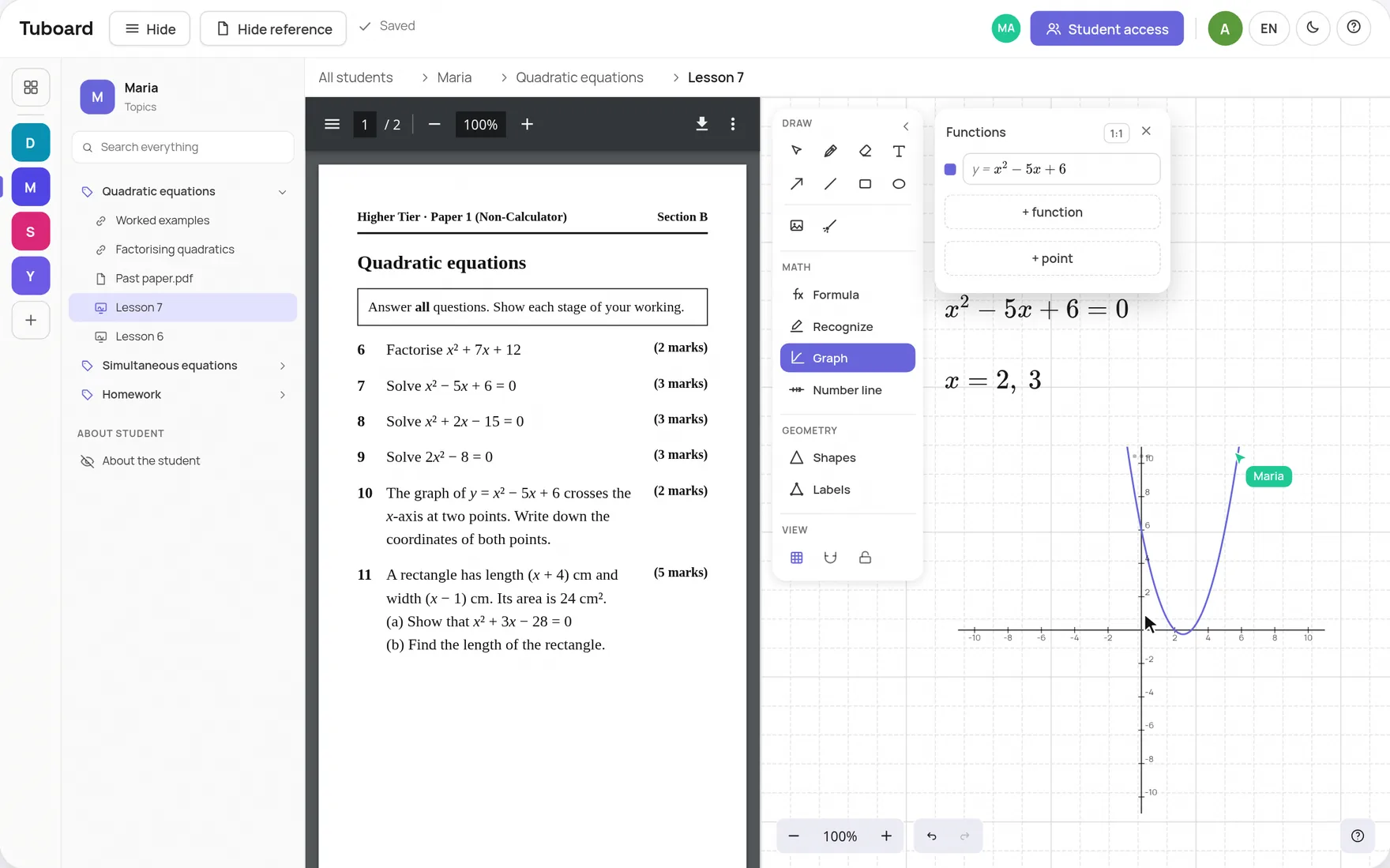
In Bitpaper a PDF goes onto the paper. In Tuboard it opens beside the board, and you write on the board.
If you see the same students every week, the filing wears you down more than the board does. In Tuboard each student has a workspace, and each topic in it holds the boards, notes, PDFs and videos from the lessons on that topic. You open Maria, open Quadratics, and carry on from last week.
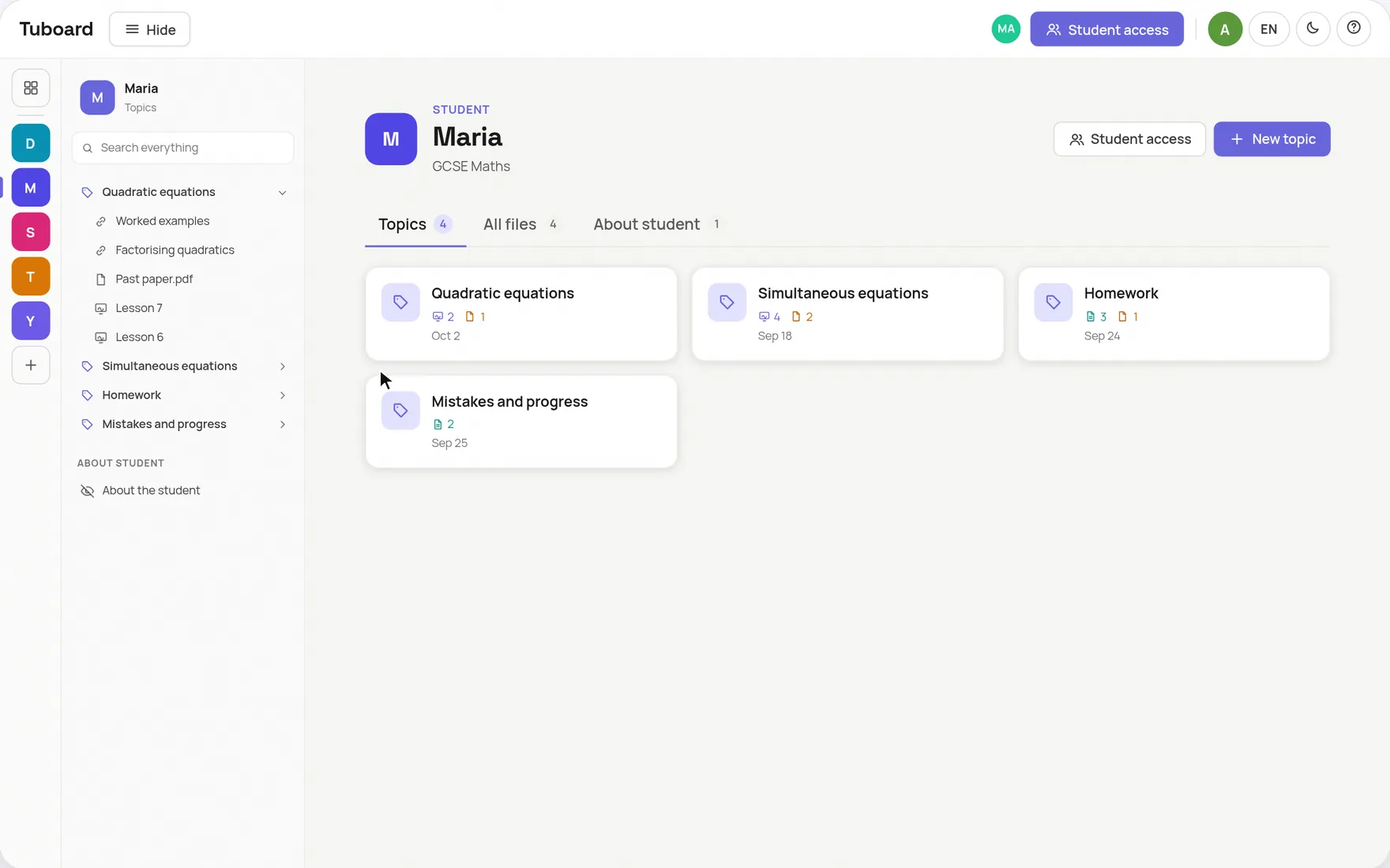
There is no importer. Export the papers you want to keep from Bitpaper as PDFs, drop each one into the right student's topic, and open it beside a fresh board in the next lesson. Moving the topic you teach now is usually enough, and the rest can stay where it is.
On bitpaper.io on 4 November 2026, the Tutor Plan is $15 a month. The free plan lets students join papers but not create them. Company accounts are priced separately.
Free while Tuboard is in beta. A free account can create and edit 3 workspaces. Tutor Pro is planned at about $10 a month and is not open yet.
No. Tuboard has no video or audio on purpose. Keep Zoom, Google Meet or whatever you already use, and open the board beside it.
Not on the PDF itself. The PDF opens beside the board, and you and your student work through the task on the board next to it.
No. They open your link and type their name. Signing in with Google is optional.
Create a workspace, add this week's topic and send the link before your next lesson.
How it works from the inside.
One workspace per student or group, sorted by topic, with the lesson inside it.
ExploreA PDF beside the board, formulas, graphs and labelled figures. The board lives in the student's topic.
ExploreFractions, roots, integrals and matrices from the keyboard. No LaTeX required.
ExploreWhy general documents and whiteboards do not carry maths in a lesson.
ExploreGuides and comparisons.
One place per student, split by topic, with the lesson taught from it.
ExploreKeep your call and open the board beside it. The student joins by link.
ExploreTuboard, Bitpaper, Lessonspace, Zoom, Miro and Excalidraw side by side.
ExploreA board students open from a link, with maths tools Jamboard never had.
ExploreFormulas, LaTeX, graphs and labelled figures on an Excalidraw board.
Explore