Skip to content

Comparison

Online whiteboards for tutoring, compared

The right whiteboard for tutoring comes down to two questions: do you want the call built in, and where should each student's work live between lessons? Below are six boards tutors actually use, compared on price, video, how a student gets in, maths tools and storage. We make Tuboard, so read our row with that in mind.

Updated

A lesson in Tuboard with a textbook PDF open beside the board. The tutor takes an exercise from the page and types it as a fraction from the symbol palette, the student types the answer on the same board, both sides of the equation are plotted as a graph next to the working, and a triangle is drawn with its corners already labelled.

Six whiteboards at a glance

Prices and features come from each vendor's own site on 4 November 2026. Plans change often, so check before you pay for anything.

Online whiteboards for tutoring compared, checked on 4 November 2026
Price for a tutorCall built inHow a student joinsMathsWhere work is kept
TuboardFree during beta. Pro planned at about $10 a monthNo. Use Zoom, Meet or any callOpens a link, types a name. No accountFormula palette, LaTeX optional, function graphs, number lines, labelled figuresA workspace per student, split into topics
BitpaperTutor Plan $15 a month. Free plan is join onlyYes, audio, video and chatJoins the tutor's paper by linkNo formula tool named on its sitePapers, each on its own link
LessonspaceFrom $9 a month for 10 hours, then billed per hourYes, video and audioOne click, no sign-up"Maths, science, language and coding tools"Spaces, often one per student, without folders
Zoom WhiteboardComes with a Zoom accountYes, it is part of ZoomInside the meeting. Sharing outside your organisation depends on settingsEquation builder from menusYour Zoom cloud, not grouped by student
MiroFree for 3 editable boards. Starter about $8 per member a month, billed yearlyVideo calls on paid plansA link, usually with a Miro accountNo formula toolBoards in a team space
ExcalidrawFree. Excalidraw+ is paidNoA live collaboration link, no accountNo LaTeX or formula tool built inYour browser, or Excalidraw+

If you want the call and the board in one tab

Bitpaper and Lessonspace are built as online classrooms: video, audio and the board together. That suits a tutor who does not want to juggle two windows. The cost is the price model and the dependence on their video. Lessonspace bills by the hour beyond what a plan includes, and Lessonspace reviewers on Capterra mention audio and video glitches.

Bitpaper

A flat $15 a month for tutors. A paper per board, with PDF import and export.

Lessonspace

Plans include a set number of hours. Students join with no sign-up.

If you already teach on Zoom or Meet

Then you only need the board, and you can pick it on how it handles maths and where it keeps things. Zoom Whiteboard is already there but files boards under your account. Miro and Excalidraw are good general boards with no formula tools. Tuboard is built for this case: no video, a maths board, and a workspace per student.

Zoom Whiteboard

No extra tool, and boards are saved to your Zoom cloud.

Miro

Strong for diagrams. Three editable boards on the free plan.

Excalidraw

Free and quick. Maths is drawn by hand or pasted in.

Tuboard

A maths board inside a workspace per student. Free in beta.

If you teach maths, check these four things

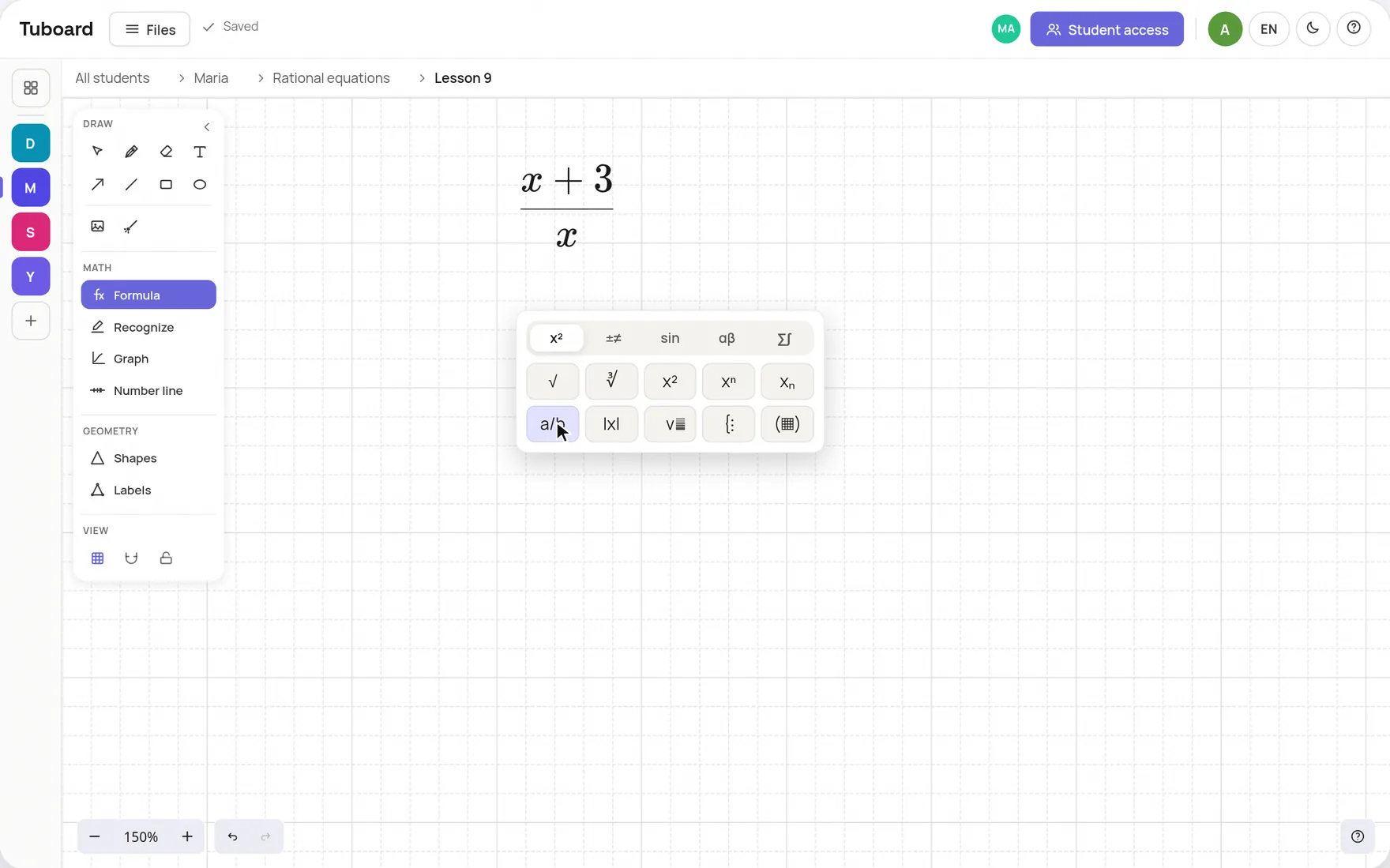
Most whiteboards are made for diagrams, and maths shows it fast. Before you settle on one, try typing a fraction, plotting a function and labelling a triangle on it, with a past paper open at the same time.

  • A formula typed from the keyboard, with no LaTeX required
  • A function graph you can edit, not a screenshot
  • Figures with their corners and angles labelled
  • The past paper open beside the board, not in another window
The Tuboard formula field with its symbol palette open: a fraction with x+3 on top being typed after a tap on the a/b button

If you see the same students every week

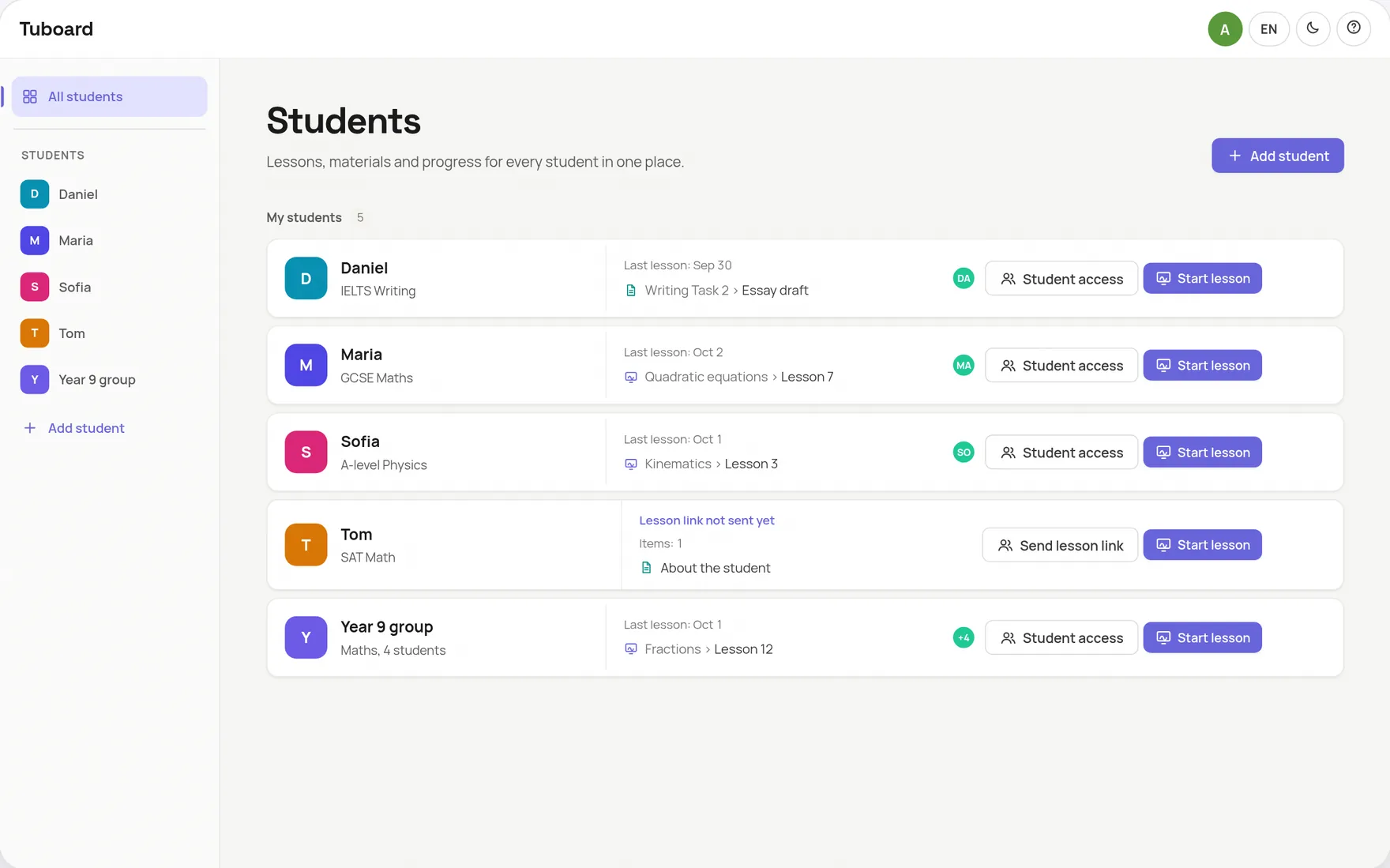
With regular students the board matters less than what happens to it afterwards. Ask of any tool: when I open this student next week, is last week's board next to their notes and their PDFs, or do I go looking? Tuboard is built around that question, with one workspace per student, sorted by topic.

  • One workspace per student or group
  • The date of the last lesson on every row
  • Boards, notes, PDFs and videos in one topic
The Tuboard overview: one row each for Daniel, Maria, Sofia, Tom and a Year 9 group, with the date of the last lesson and the last thing opened on every row

The short answers.

What is the best online whiteboard for tutoring?

It depends on your setup. If you want video built in, Bitpaper and Lessonspace put the call and the board in one tab. If you already teach on Zoom or Meet and see the same students every week, Tuboard keeps each student's boards, notes and PDFs together. For a quick free sketch, Excalidraw is the simplest choice.

What is a good free whiteboard for maths tutoring?

Tuboard is free during its beta and has a formula palette, function graphs and labelled figures, and students join with no account. Excalidraw is free but has no formula tool. Zoom Whiteboard comes with Zoom and builds equations from menus.

Which whiteboards let students join without an account?

Tuboard, Lessonspace and Excalidraw all let a student in from a link without signing up. With Miro and Zoom Whiteboard it depends on how the board is shared and on your account settings.

Which whiteboard works with Zoom?

Any web whiteboard works beside Zoom: you send its link in the Zoom chat. Zoom also has its own whiteboard. Tuboard, Excalidraw and Miro all run in a browser tab next to the call.

Is this comparison biased?

We make Tuboard, so check our claims. Every price and limit for the other tools comes from the vendor's own site on the date at the top of this page, and the page says where another tool is the better fit.

Try the maths test on Tuboard.

Open a board, press M, type a fraction and plot it. No sign-up needed.