For tutors who teach math online
All the work with a studentin one workspace
One workspace per student or group. The board, the notes, the textbook and the homework live there, not in a chat.
Works in the browser. Free while Tuboard is in beta.
- Free during beta
- The student joins by link
- Nothing to install
Workspaces
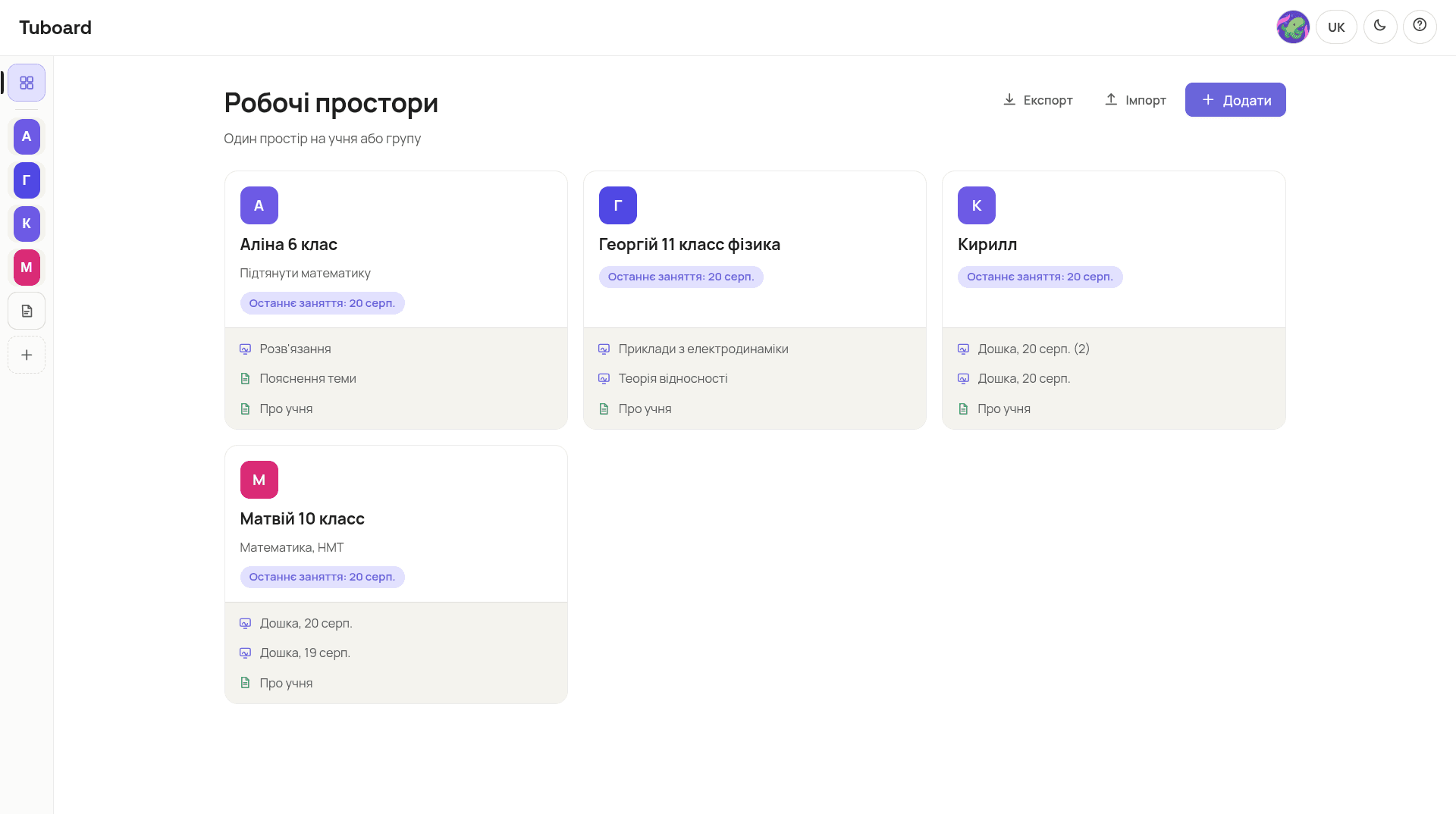
One workspace per student or group.
You open Tuboard and see your students. Each one has their boards, notes, files and homework, not a pile of chats.
One workspace per student or group
Alina, Georgiy, Matviy. Each opens on its own, and the materials do not mix.
Last lesson is already on the card
The date and what you did sit on the card. No hunting through chat history.
Tools and materials together
Boards, notes, the textbook and homework live in that workspace. Next time you open it from here.
The board
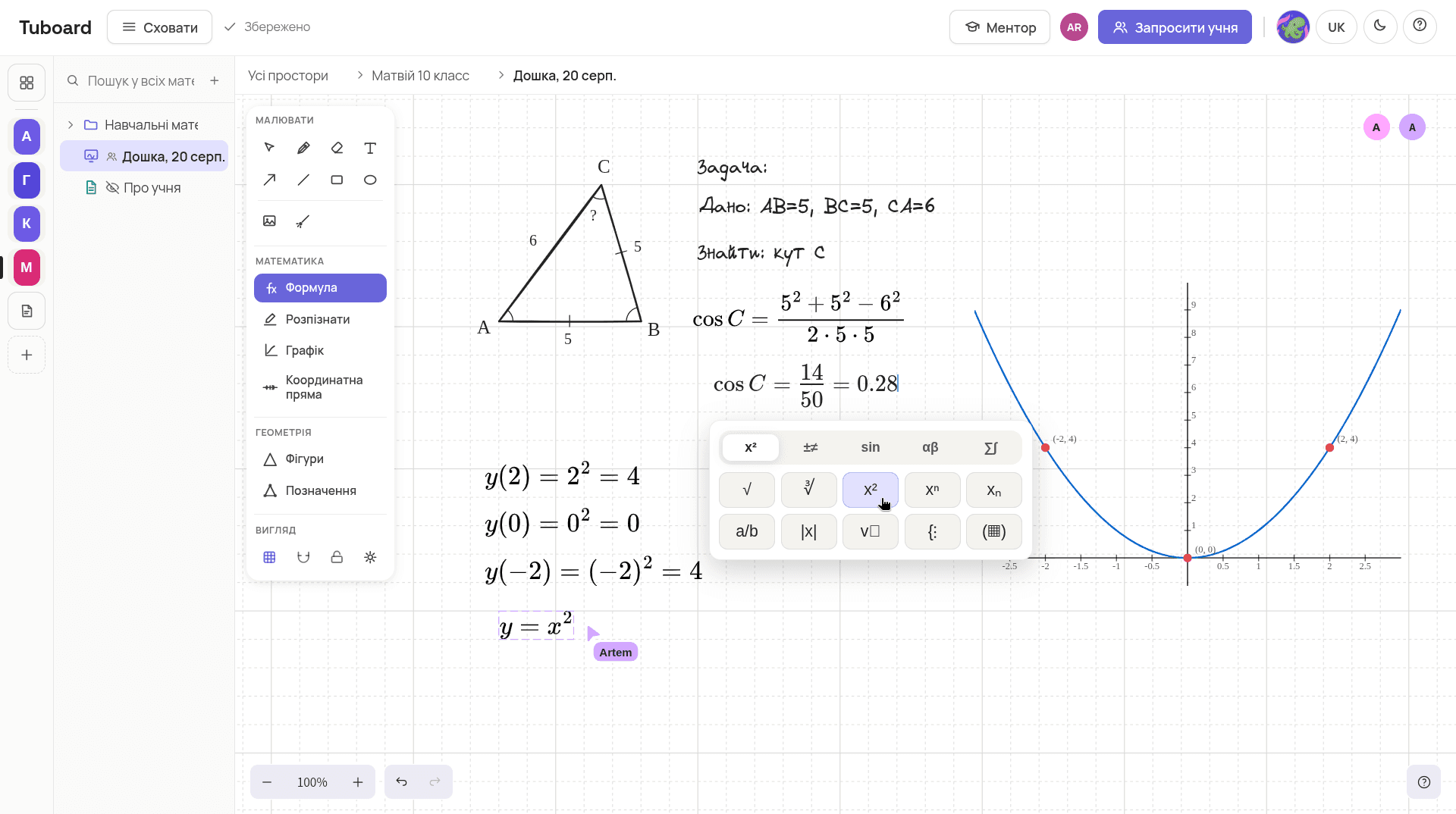
A triangle, a formula and a graph on one board.
The symbol palette sits under the cursor. The student sees the same canvas you do. No photographing the board and sending it in chat.
Formulas from the palette
Tap x² and keep typing. You do not need to know LaTeX.
The graph sits next to the solution
You do not plot the curve in another window and paste a picture.
A figure with labels
Draw a triangle and the sides and angles are already on it.
The lesson
A lesson with nothing to send.
Homework in the messenger, the board on another service, the textbook somewhere else. Here it already sits in the student's workspace.
- 01
Open Maria
You see the last topic, the textbook, and where you stopped last time.
- 02
Send the link
One student or the whole group writes on the same board you do. Changes show up as they happen.
- 03
It stays in the topic
You do not send the solution or the file anywhere. Next time you open it from here.
Free while Tuboard is in beta
Take one student, run one lesson, and tell us what broke. That is the whole deal right now.
- 01Unlimited workspaces, students and groups
- 02Boards, notes and files in the topic
- 03The student joins by link
- 04Export your materials to a file
Tutor Pro is planned at UAH 199 a month. We will publish the exact limits before payments start. Nothing you have already made will disappear.
Common questions
What people usually ask.
Does my student need an account?
They open the link and sign in with Google. There is no separate Tuboard registration.
Can I run a group instead of one student?
Yes. A workspace opens to several students: you send each of them the link and everyone works on the same board. You decide who can edit and who only watches.
What if I do not teach math?
The workspace is the same: topics, notes, files and homework all work the same way. You simply will not need the formula palette. English and IELTS tutors run their lessons in Tuboard too.
How is this different from a whiteboard like Miro?
Miro stores a canvas. In Tuboard everything is gathered around the student: folders, topics, the textbook and homework. A formula is its own object, not a text label.
Do I need to know LaTeX?
No. Press M on a board or Ctrl+M inside a note and type. Fractions, roots, integrals and matrices sit in the palette next to the cursor. LaTeX works too if you prefer it.
Where are the materials stored?
In your browser while you are signed out. After you sign in they sync to your account, so the same workspaces open on another computer. Export can save a copy to a file whenever you want.
What will it cost?
Nothing during beta. Tutor Pro is planned at UAH 199 a month. We will publish the limits before payments start.
In more detail
How it works from the inside.
Three pages: what sits in a student's workspace, how formulas get typed, and why general boards do not carry math.
The student workspace
Notes, boards, the textbook and homework in one folder per student or group.
ExploreFormulas and graphs
Fractions, roots, integrals and matrices from the keyboard. No LaTeX required.
ExploreInstead of Notion and Miro
Why general documents and whiteboards do not carry math in a lesson.
ExploreTry it on one student.
Create a workspace, put the next topic in it, send the link to your student. That is the whole setup.